SHOUTcast Widgets V10, Now with a Live DJ Studio
20+ live widgets for your radio website, plus a browser-based DJ booth that goes live to AzuraCast with one click. Nothing to download, nothing to install.
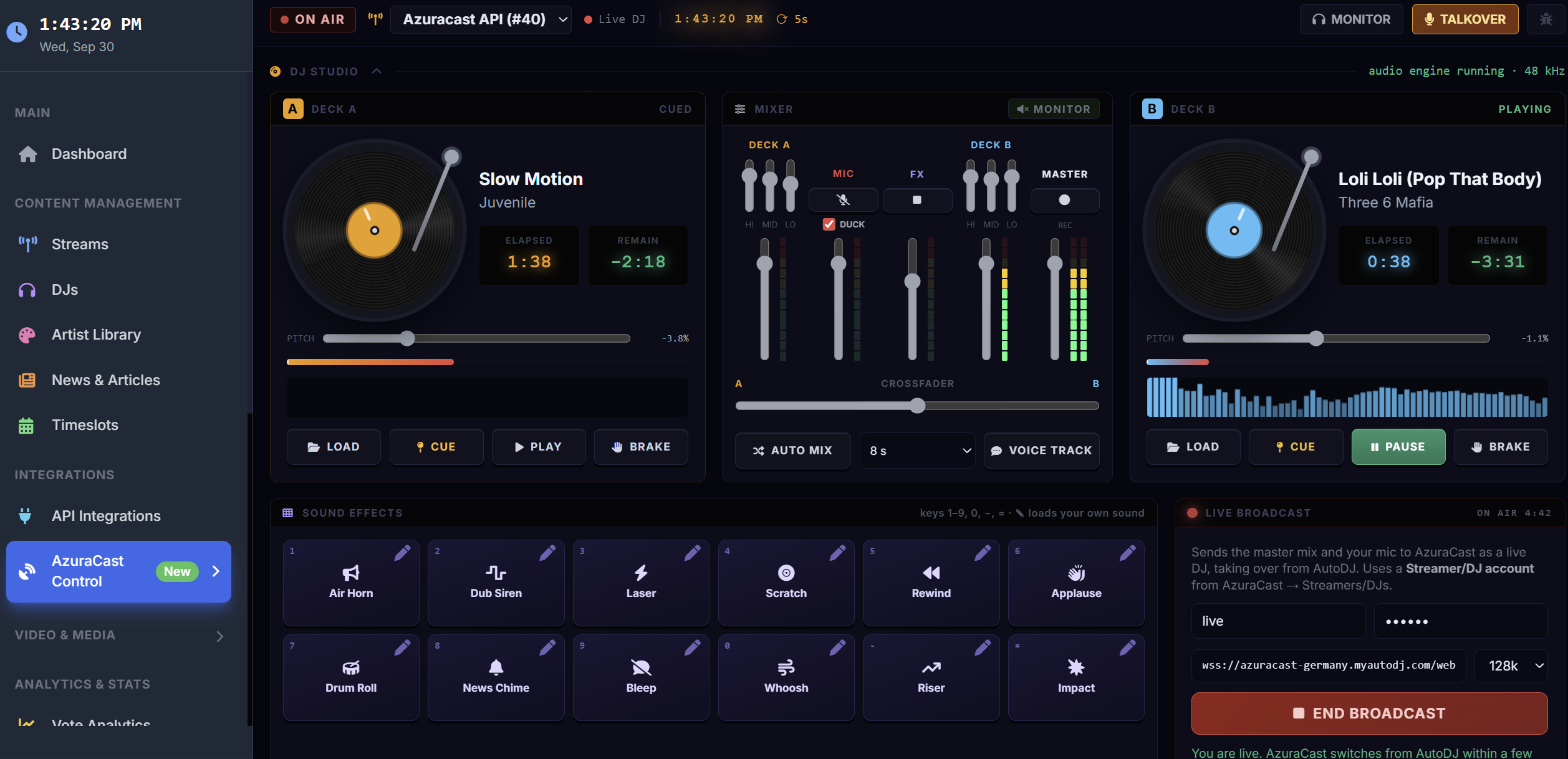 12 sound effects
The AzuraCast DJ Studio
A full DJ booth in your browser. Mix on twin decks, talk over the music, fire off effects, and go live to your AzuraCast station without any broadcast software.
The usual way
- Download and install broadcast software
- Configure encoders and server settings
- Route audio from your mixer and mic
With the DJ Studio
- Open your browser
- Log in
- Press Go Live
Twin Turntables
Spinning platters, cue points, ±8% pitch, tempo nudge, and a vinyl-style brake. Load tracks from your station library or your computer.
Pro Mixer
3-band EQ per deck, channel faders, an equal-power crossfader, stereo meters, and Auto Mix.
Go Live from Your Browser
Sends your mix and mic to AzuraCast with your DJ login. AutoDJ pauses automatically while you're on air.
Talk Over the Music
Open the mic or hold Space to talk. The music ducks automatically, with no feedback.
12 Studio Sound Effects
Loudness-matched effects on keys 1 through =. Swap in your own sounds on any pad.
Voice Tracks
Record and preview a voice track, then schedule it to play now or after the current song.
Station Control
Now-playing countdown, skip, restart, stop/start, queue, recently played, and instant-play requests.
Record Your Mix
Capture the master output straight to your computer for podcasts and replays.
Smart Playlists
Scored by listener votes, play history, and freshness, with station IDs and ads slotted in. Syncs to AzuraCast by public URL.
Connect AzuraCast
Paste your AzuraCast API key under API Integrations.
Load & Mix
Drop tracks on the decks and set up your mix.
Go Live
Enter your DJ login and press Go Live.
Requirements
- An AzuraCast station
- Streamers/DJs enabled, with a DJ account
- Desktop Chrome, Edge, or Firefox
Everything Your Radio Website Needs
Live, customizable widgets that drop into any website with a copy-and-paste embed.
Real-Time Updates
Track, artist, listener count, and DJ refresh every 10–30 seconds.
Fully Customizable
Match your brand with your own colors, themes, fonts, and layouts.
Responsive Design
Every widget looks right on desktop, tablet, and mobile.
Multi-Platform Support
SHOUTcast, Icecast, AzuraCast, MediaCP, and custom streaming servers.
Artist Information
Artist bios, images, and album artwork pulled from Last.fm and Spotify.
Easy Integration
Copy-and-paste embeds for WordPress, Wix, Squarespace, and any HTML site.
Event Management
Recurring shows, special events, and broadcast schedules with automatic timezone conversion.
DJ Profiles
Photos, bios, and social links for every DJ, plus a live "on air now" display.
Analytics & Insights
Listener stats, peak times, popular tracks, and listener geography.
A Widget for Every Part of Your Site
Every plan includes every widget type.
What's New in Version 10
AzuraCast DJ Studio
Turntables, mixer, browser go-live with mic ducking, 12 effect pads with custom sounds, voice tracks, mix recording, now-playing countdown, and instant-play requests.
See the DJ Studio →Version 10
Rebuilt on PHP 8 with 20+ widgets, event management, DJ profiles, an AzuraCast control panel, website builder, listener maps, analytics, song voting, and WHMCS provisioning.
Public Beta Completed
Internal Testing Completed
Coming to Version 10
Mobile DJ app, social auto-posting, listener accounts, a live chat widget, and multi-language support.
See It in Action
SHOUTcast Widgets Overview
A walkthrough of the features and widget options
Website Builder Tutorial
Build your station website with the included builder
Choose Your V10 Plan
Every plan includes all 20+ widget types. Pick the one that fits how many streams you run.
Basic
For a single station
- Up to 3 Streams
- All 20+ Widget Types
- Basic Customization
- Email Support
Pro
For growing networks
- Up to 10 Streams
- All 20+ Widget Types
- Advanced Customization
- Premium Themes
- Priority Support
Business
For networks and resellers
- Unlimited Streams
- All 20+ Widget Types
- Full Customization
- White Label Option
- 24/7 Priority Support
DJ Studio Questions
Do I need DJ software?
What do I need to go live?
Where do I find my DJ credentials?
Can listeners hear me when I'm not live?
What's the difference between going live and a voice track?
Can I play ads and station IDs?
Are the sound effects safe to broadcast?
I see "Could not connect (code 1006)". What do I do?
More help in the DJ Studio guide or open a support ticket.
Ready to Upgrade Your Station?
Get 20+ live widgets and a browser DJ Studio for your station, starting at $4.95/month.