
SmartStream by My Auto DJ
The radio station that runs itself
Always on air, ready for a live DJ at a moment's notice, and light enough to never get in your way.
- Icecast and SHOUTcast on the same station
- AutoDJ that learns what your listeners like
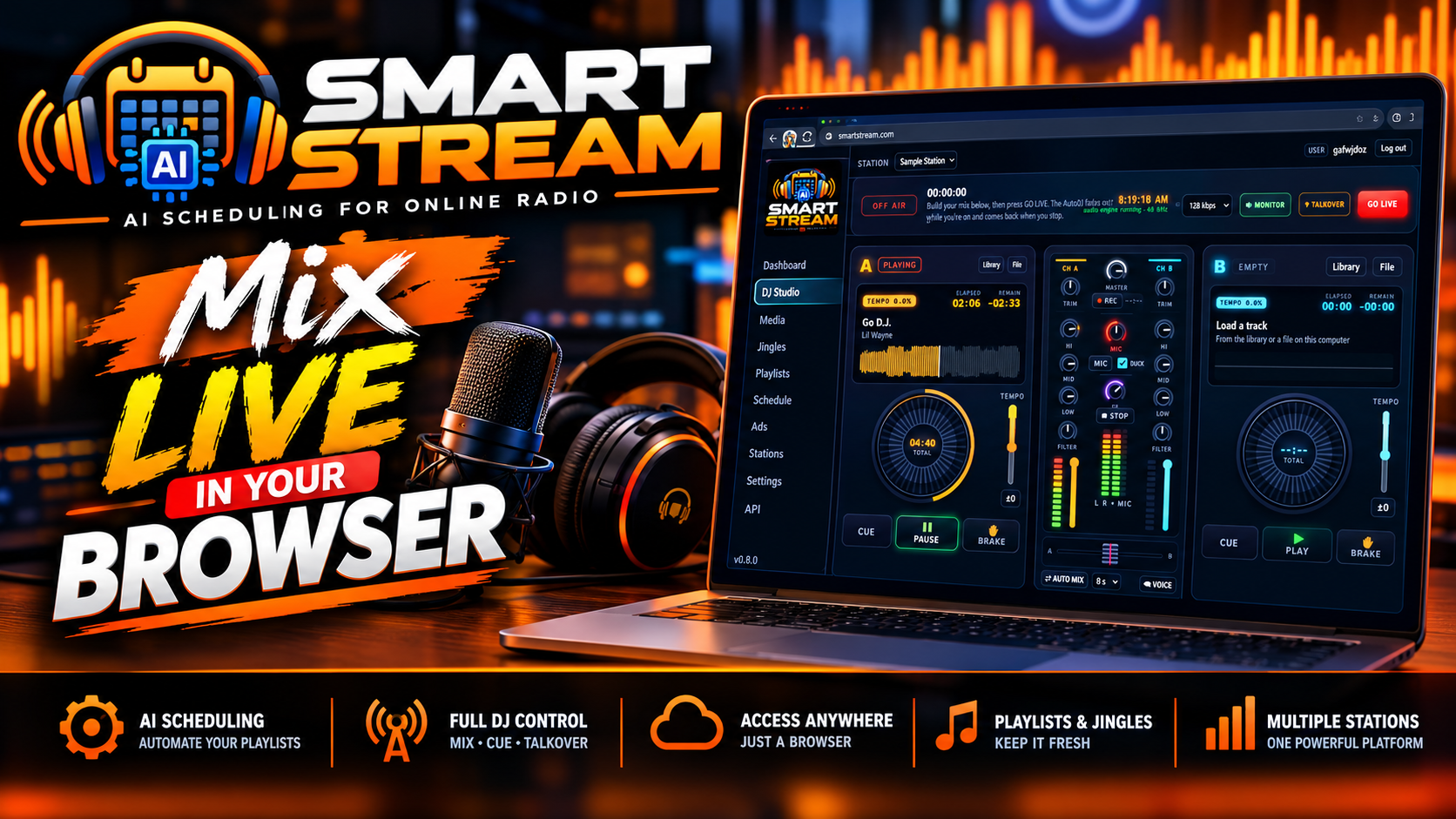
- Two deck DJ studio right in your browser
- Scheduling, jingles, audio ads and analytics
- Station website and Roku channel included
15 day trial. No payment details. Set up instantly.
On air, even when you are logged out
CPU used per station
Stream quality up to 320 kbps
Per month to get started
Why SmartStream
Most radio panels play a folder of songs on shuffle. SmartStream was designed around how a working station actually sounds: music that is rotated with care, imaging that lands in the right place, and a live studio that is one click away. Upload your music, press play and you are broadcasting.
Programs like a music director
Artists and songs are kept apart automatically, and the spacing grows as your library grows. Tracks that have been resting get their turn first.
An AutoDJ that pays attention
SmartStream scores every play by what your audience did next. Did listeners stay, leave or skip? That feedback shapes the rotation, so your station sounds better the longer it runs, without you building a single playlist by hand.
Want to see the reasoning? Rotation insights show each track's chance of playing next, when it last aired and how listeners reacted to it.
Try it free- Non-stop playback with smooth crossfades between every song
- No artist repeat and no track repeat rules, and the panel tells you how far apart your library can keep them
- Listener-aware ratings based on audience gained, audience lost and skips
- Playlist weighting from 1 to 10 to decide how often each playlist airs
- In-order playlists for countdowns, fixed sets and audiobooks
- Automated song requests from your listeners
A full DJ booth in a browser tab
No encoder to configure and no software to buy. The SmartStream DJ Studio gives you everything needed for a live show from Chrome or Edge on your computer.
- Two decks with waveforms, cue, tempo and brake
- Mixer with trim, 3 band EQ, filter and crossfader
- Auto Mix for hands free crossfading
- Mic talk-over with automatic music ducking
- Echo, reverb and flanger beat effects
- 15 sound pads you can swap for your own audio
- Voice tracking: record a break and queue it next
- Fire station IDs, liners and promos on demand
- Listener location ticker for shout-outs
- Local weather strip with official alerts
TALK-UP bar New
Never run out of things to say. While a song plays, the studio shows facts about the current and upcoming artist: photo, hometown, genres and a short bio, ready to read on air.
Fresh in SmartStream
SmartStream is updated constantly. Here is what has landed recently, all included with every plan.
Station website with AI design New
Every station comes with a mobile friendly website showing your live player, the song on air, recent tracks and artist photos. Choose a colour, add a tagline and publish. For a custom look, describe what you want in plain words and Claude AI builds a draft you can preview before it goes live.
DJ accounts New
Give each DJ a personal login and keep your station password private. They connect from home with BUTT, Mixxx, SAM Broadcaster, RadioDJ, VirtualDJ and more. The AutoDJ fades out when they start, fades back when they finish, and you get a history of who was live and for how long.
Your own domain New
Put your station website on your own domain name. The panel walks you through the single DNS record you need, then sets up a free HTTPS certificate for you automatically.
Honest listener numbers New
Analytics now count a unique listener only after a full minute of listening, and filter out bots, monitors and directory checkers. See live maps, peak hours, session lengths, countries and cities, with around 13 months of history.
TuneIn now playing New
Your current artist and song title appear on your TuneIn page and in the TuneIn apps, refreshed at every song change and during live shows. Just enter the details TuneIn gives you.
Pick your stream quality New
Change your station bitrate whenever you like, up to your plan limit. The dashboard also gained artist photos on both decks and a Listen button, so you can hear exactly what your audience hears.
Describe your website. Watch it get built.
The starter website is free and ready to publish. If you want something more personal, connect Claude AI and ask for it the way you would ask a designer: "dark and moody with neon accents" or "move the schedule above the player".
- Open the Website page for your station in the panel and publish the starter site.
- Optional: add a little credit to your Anthropic Console account, create an API key and paste it into SmartStream.
- Type what you would like and click Build with Claude. Check the draft on mobile and desktop, then publish or discard it.
Good to know
- The starter website costs nothing extra.
- AI design is optional and billed by Anthropic straight to your own Console account. We add no markup.
- A typical design run costs well under $1, and you see an estimate after each build.
- Choose the Claude model that suits you: Opus for polished results at a sensible price, Sonnet when speed matters most, or Fable for the most demanding redesigns.
- Every design is saved, with full version history to roll back to.
- Claude Pro and Max subscriptions cannot be used for this. An API key is required.
- Contact forms are not supported. Listener messages reach you through an email link.
The whole Toolkit
One panel covers the stream, the music, the schedule, the sound of your brand and the revenue.
Streaming
- Icecast, SHOUTcast or both at once
- http and https on the same port, so secure websites play without errors
- Free SSL certificates, renewed automatically
- Listener counts and server status at a glance
Media library
- Drag and drop uploads in your browser
- MP3, FLAC, OGG, Opus, WAV, M4A/AAC and more
- Files converted to your station quality for you
- Playlist builder with search and Add all
Scheduling
- Clockwheels with song, jingle, sweeper and ad slots
- Paint clocks onto a 7 day, 24 hour grid
- One time or weekly shows with priorities
- Everything runs in your station time zone
Station imaging
- Station IDs, sweepers, liners, promos and bumpers
- Sweepers play over song intros with the music lowered
- Simple rules: a jingle or sweeper every N songs
- One tap imaging pads on the dashboard
Advertising
- DAAST and VAST audio ads built in
- Works with AdsWizz, Triton, Spotify Ad Studio and others
- Impressions, quartiles, completes and skips tracked
- If a break cannot be filled, the music keeps playing
Reach and promotion
- Your own Roku TV channel, built in the panel
- One click Radio Browser listing for VLC, Kodi, smart speakers and car radios
- Icecast and SHOUTcast directory listing
- Promotion kit for Radio Garden, iHeartRadio, Streema, TuneIn and more
Panel available in English, Spanish and French. Stations in the United States need a paid TuneIn On Air account to be listed on TuneIn.
Your show timetable, on any website
Add your weekly shows once in the panel and SmartStream turns them into a tidy timetable for your site. Change a show and the timetable updates by itself. It takes a single line of code and works on WordPress, Wix, Squarespace, plain HTML and your SmartStream station website, in light or dark.
The embeddable web player works the same way. Pick a small bar or a large player with cover art and a visualizer, match your colours and fonts, then copy the code. Save a change later and every site using the player updates too.
Example timetable embed
<script async
  src="https://smartstream.myautodj.com/static/js/schedule-embed.js"
  data-src="https://smartstream.myautodj.com/player/1/schedule?theme=light">
</script>
Your own code, with your station number already filled in, is waiting for you in the panel.
Sell radio hosting under your own brand
SmartStream is ready for resellers and hosting providers from day one.
Accounts and API
Admin, reseller and customer accounts, each with limits for stations, listeners, bitrate and disk space. Manage your own customers, or automate it all through the REST API.
WHMCS module included
Automatic setup, suspension, upgrades and termination. Customers log in with one click from your client area and see live station status. Welcome emails and 16 help articles come ready made.
Backups and restores
Back up to S3 style storage such as AWS, Cloudflare R2, Backblaze B2 or Wasabi. Media syncs file by file, snapshots run daily or weekly, and you can restore a whole server or a single account.
Choose your Plan
No features are held back for higher tiers. Every plan has the smart AutoDJ, scheduling, the browser DJ Studio and audio ads. You only choose the audience size, quality and storage you need.
Free Trial
- 50 Listeners
- Up to 128 kbps
- 10 GB Disk Space
- Icecast & SHOUTcast
- Smart AutoDJ
- Browser DJ Studio
- Audio Ads (DAAST/VAST)
15 days. Cancels automatically if you do not upgrade.
Starter
- 50 Listeners
- Up to 128 kbps
- 10 GB Disk Space
- Icecast & SHOUTcast
- Smart AutoDJ
- Browser DJ Studio
- Audio Ads (DAAST/VAST)
A great fit for a new station finding its audience.
Pro
- 100 Listeners
- Up to 320 kbps
- 25 GB Disk Space
- Icecast & SHOUTcast
- Smart AutoDJ
- Browser DJ Studio
- Audio Ads (DAAST/VAST)
Twice the audience, with full quality 320 kbps sound.
Premium
- 500 Listeners
- Up to 320 kbps
- 50 GB Disk Space
- Icecast & SHOUTcast
- Smart AutoDJ
- Browser DJ Studio
- Audio Ads (DAAST/VAST)
Room for a big library and a growing audience.
Prices shown are per month. Hosting your own customers? Ask us about reseller plans.
On air in Four Steps
1. Log in
Use the details in your welcome email, or click Login to Radio Panel in your client area.
2. Upload music
Drag your files onto the Media page and wait for each one to show as ready.
3. Press play
Start the AutoDJ from the dashboard. Playlists are optional, smart rotation works right away.
4. Share it
Copy your listen link, or embed the web player on your own website.
Questions & Answers
Yes. The AutoDJ lives on our servers, not on your computer, so it plays around the clock and starts itself again after any maintenance. The only time a browser has to stay open is while you are broadcasting live from the DJ Studio.
Yes. BUTT, Mixxx, SAM Broadcaster, RadioDJ, RadioBOSS, VirtualDJ and OBS with an Icecast plugin all work. Your connection details are shown in the panel. On Icecast, your live show takes over from the AutoDJ automatically and hands back when you disconnect. On a SHOUTcast only station, press Stop on the dashboard before you connect.
It will. Every SmartStream station has an HTTPS stream address with a free certificate. Use that address, or the embed code from the Player page, and browsers will not block your audio.
MP3, FLAC, OGG, Opus, WAV, M4A/AAC, WMA and AIFF. Each upload is converted to your station's bitrate and sample rate. If a file shows an error it is usually damaged or copy protected, so try another copy or convert it to MP3 or FLAC first. Tagging your files before uploading gives you correct titles and artwork.
Try a lower bitrate such as 96 or 64 kbps, which helps listeners on slow or mobile connections. If it only happens during live shows, check your own upload speed and use a wired connection rather than WiFi.
Open Directory listing on your dashboard, tick the box to list your station, then add a genre and a short description. Icecast needs nothing more. SHOUTcast needs a free authhash from the SHOUTcast radio manager. Your station has to be on air to appear.
The trial runs for 15 days and then cancels on its own. There is nothing to pay and nothing to remember. If you want to keep your station, upgrade to a paid plan from your client area before the trial ends.
Our knowledgebase covers everything from your first login to running ads:
- Getting started with SmartStream
- Building playlists
- Scheduling shows and clockwheels
- Using the browser DJ Studio
- Going live with your own software
- Adding DJs to your station
- Running ads on your station
- Using the website builder
Your station could be on air today
Streaming, a smart AutoDJ, scheduling, ads and a live studio, all in one panel that keeps working while you sleep.
Start Your Station Ask a Question